

Create a Pitchbend Kill Switch
Let one sound bend with the pitch plates while a second one holds its pitch, a guitar-style double-stop effect.


Now weʼre going to build a pitchbend kill switch. This is great if youʼre driving more than one sound source at a time and want one to react to pitchbend and the other to not. By using two different MIDI channel strips, you can set one to allow pitchbend to pass through and kill the pitchbend on the second path. Itʼs a great effect for guitar sounds. Try routing one channel strip to a lead guitar sound and the other to the same sound but with pitchbend disabled. Set your EWIʼs max pitchbend amount to say a third or a fourth in width. While playing use the pitchbe plates and youʼll get an effect very similar to a guitarist using double stops but bending one string while maintaining the pitch of the other, Itʼs a very cool effect! Also works great for harmonica too!
Same routine… Either copy and paste or OPTION + Drag copy your original Vol Kill widget to create a new copy. Unpack it and set the TRANSFORMER object to the following settings:
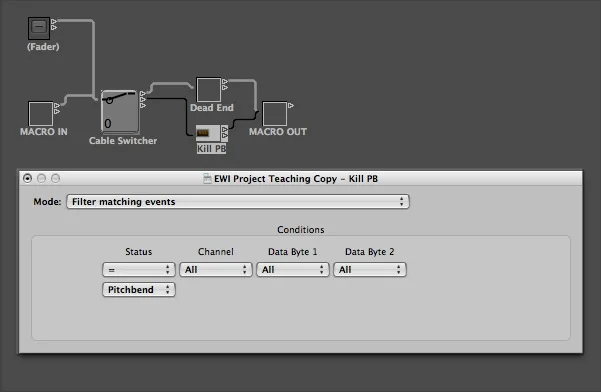
MODE: Filter matching events. Kinda self explanatory. We want to filter the pitchbend events from the MIDI signal
STATUS = Pitchbend
CHANNEL : All
DATA BYTE 1 : All
DATA BYTE 2 : All
Thatʼs it! Youʼve now filtered out pitchbend. Select all your objects and pack them into a new MACRO. Rename your new widget Kill PB.

Stuck on a step, or want a hand with your own rig? Ask, and I'll help if I can.
Ask a question